How to Find a Game’s New Official Website and Customer Support After Its Publisher Changes
When a game transfers publishing rights to a new company or a development studio splits off to self-publish, players often face sudden disorientation. Legacy homepage URLs stop functioning, customer support portals cease accepting tickets, and the risk of losing account progress or purchased items rises. To avoid phishing websites and preserve your account data, you need a structured method to verify official information directly from primary sources.
Official Signals and Verification Channels During a Publisher Transfer
Every publisher transition involves legal contracts and required platform metadata updates. Before relying on search engines, verify official distribution platforms where licensing information updates first.
Checking Store Metadata on Steam, Epic Games Store, and Console Stores
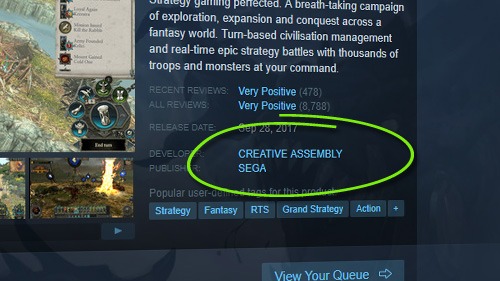
Digital storefronts such as Steam, Epic Games Store, PlayStation Store, and Xbox Marketplace maintain strict control over the publisher metadata field.
- Publisher Line: Once a transfer is officially completed, the “Publisher” field on the store page is updated directly by the platform administration.
- News Hub: Developers routinely post a formal Transition Notice within Steam Community Announcements or Epic Games News prior to taking down legacy websites.
Direct Community Communication Channels (Discord, X/Twitter)
Social media platforms and official community servers offer real-time operational updates:
- Official Discord Server: Check pinned messages in channels such as
#announcementsor#faq. Community Managers consistently maintain updated links to new support portals here. - Verified X (Twitter) Accounts: Check the bio section of official verified game handles. During a publisher handover, official account bio URLs update immediately.
4 Step Protocol to Locate the New Official Website
Avoid clicking random search engine results. Follow these four steps to navigate directly to the game’s new official domain:
- Step 1: Check transition notices on the legacy website: If the old domain remains accessible, locate any redirect banners or transition posts that link directly to the new official domain.
- Step 2: Use precise search syntax: Query
[Game Title] + [New Publisher Name] + "Official Site"in your search engine. Skip any search results marked with “Sponsored” or “Ad”. - Step 3: Analyze the domain architecture: The new website often operates as a subdomain under the new publisher’s root domain (e.g.,
game.newpublisher.com) or under an independently registered trademarked domain. - Step 4: Verify footer copyright information: Scroll to the bottom of the new webpage. A legitimate site will display the new publisher’s registered legal business name, age classification ratings (ESRB/PEGI), and updated Terms of Service.
Accessing the Help Desk and Managing Account Migration
Publisher changes frequently require restructuring user database systems. Legacy support portals are typically frozen or retired due to data privacy boundaries.
Submitting Support Tickets Under the New System
Most incoming publishers cannot automatically ingest open support tickets from legacy databases due to strict privacy compliance regulations (such as GDPR).
Step 1: Register a new portal account: You will need to create a new user profile on the incoming publisher’s dedicated support portal.
Step 2: Provide legacy reference codes: When submitting a new ticket, include your previous ticket ID, order confirmation numbers, or purchase receipt screenshots from Steam or console storefronts to accelerate identity verification.
Preserving Save Data and Managing Account Migration
Protecting your character progress, inventory items, and save data requires careful execution during a handover:
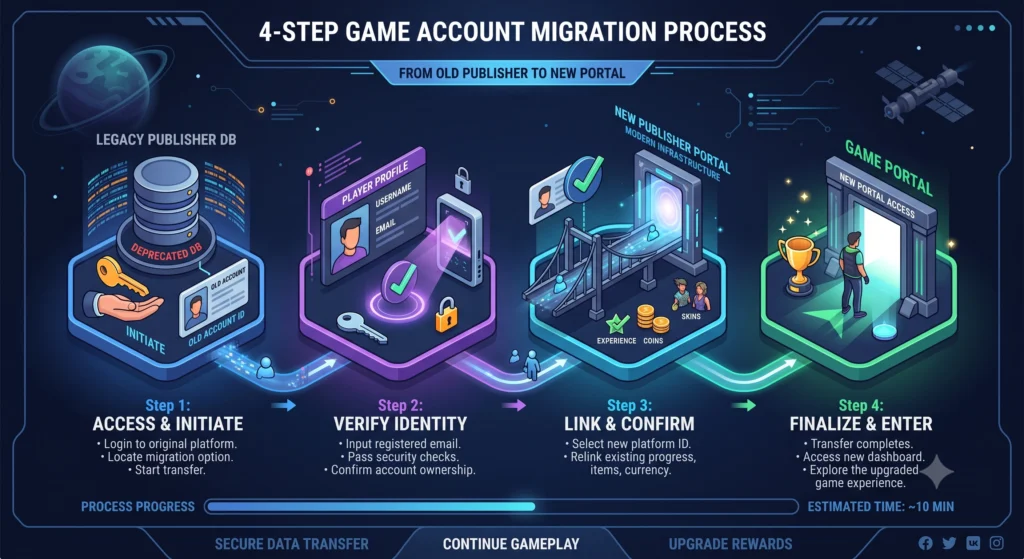
- Migration Tokens/Codes: Certain games require logging into the old publisher system to generate a unique Migration Token or Code, which you then redeem on the new publisher’s migration portal.
- OAuth Third-Party Linking: Many platforms allow you to directly link your Steam, Epic Games, PlayStation, or Xbox account to the new Publisher ID to automatically sync purchases and save states.
Distinguishing Official Channels from Phishing Scams
| Criteria | Official New Publisher Channel | Fake / Phishing Channel |
|---|---|---|
| Domain URL | Matches the publisher’s main corporate root domain | Typosquatting, strange symbols, or low-cost TLDs (.xyz, .info) |
| Login Prompts | Redirects to standard OAuth prompts (Steam, Epic, Consoles) | Demands raw passwords or OTP codes directly on custom forms |
| Support Hub | Ticket portal with unique tracking IDs or corporate emails | Generic Google Forms or free email addresses (Gmail, Outlook) |
| Account Alerts | Transparent migration windows without immediate lockout threats | High-pressure threats like “Account will be deleted in 24 hours” |
Cybersecurity Awareness: Avoiding Phishing Traps During Transitions
Publisher handovers create prime opportunities for malicious actors to launch targeted phishing campaigns aimed at acquiring high-value game accounts.
Verify via Game Launchers: If you are unsure about a web URL, launch the game directly via Steam, Epic Games, or its official desktop launcher. Embedded store and news links within verified launchers are guaranteed to be safe.
Never click Search Ads (Google Search Ads): Attackers often purchase sponsored keywords such as [Game Title] support or [Game Title] account transfer. Always bypass results labeled “Sponsored” or “Ad”.
Never share Passwords or OTP Codes: Official support personnel only require your Player ID (UID) or Migration Code. No legitimate representative will ask for your password.